Hardware and Software Requirements - Account Servicing
These specifications are intended solely for the usage of the Account Servicing modules in Lifecycle Management Suite.
Server Hardware Recommendations
The following hardware recommendations have been based on the assumption that the designated servers are not shared with any additional high-volume, high-performance web applications. These specifications are a recommendation only, and are subject to change based on individual customer business requirements and infrastructure needs.
These specifications are for the usage of the collection and service modules in Lifecycle Management Suite.
The Total Concurrent Users represents the total number of users expected on the system at any one time. This is not necessarily the total number of users that will exist in the system.
|
|
Total Concurrent Users | |||
|---|---|---|---|---|
| Less than 50 | 50-100 | 100-300 | More than 300 | |
| Database Server |
Please contact a business development representative for configurations requiring greater than 300 users. A loan balanced and/or clustered solution will be implemented in this case |
|||
| Processing | Dual Core 2+ GHz 800 MHz front side bus 2 MB L2 cache |
Quad Core 2.5 GHz 800 MHz front side bus 2 MB L2 cache |
2x Quad Core 2.5 GHz 800 MHz front side bus 2 MB L2 cache |
|
| Memory | 16 GB | 32 GB | 32 GB | |
| Free Disk Space | 100 GB | 250 GB | 500 GB | |
| Web/Application Server | ||||
| Processing | Dual Core 2+ GHz 800 MHz front side bus 2 MB L2 cache |
Quad Core 2.5 GHz 800 MHz front side bus 2 MB L2 cache |
2x Quad Core 2.5 GHz 800 MHz front side bus 2 MB L2 cache |
|
| Memory | 8 GB | 16 GB | 16 GB | |
| Free Disk Space | 50 GB | 100 GB | 250 GB | |
Temenos permits the use of other applications on the same database/web server as long as the resource requirements of these other applications do not negatively impact Lifecycle Management Suite in any way. The customer is responsible for ensuring that all other applications sharing the database/web servers support the minimum server software requirements for Lifecycle Management Suite (including but not limited to IIS version, .NET Framework version, Component Services version, etc.). Customer also agrees to make no deviations from the
Implementation projects often require two databases to be online at the same time. Customers must be prepared to accommodate 2x the Free Disk Space requirements identified above for the Database Server. This is not a permanent requirement and only needs to be accommodated during the life of an implementation project.
Customers with 10 or few users can utilize a single server setup and follow the guidelines for the combined Database, and Web/Application Server hardware specifications.
Certain Release/Edition/Platforms of Windows support a maximum of 4GB RAM. In order to implement more than 4 GB RAM, customer must use a compatible Windows Release/Edition/Platform.
See http://msdn.microsoft.com/en-us/library/aa366778%28v=vs.85%29.aspx for more information.
Server Software Requirements
| Database Server |
|---|
| The Windows Server operating system for either 32 or 64 bit. |
| The Microsoft SQL Server database software for either 32 or 64 bit. |
|
(3) databases are created on the database server:
Reporting Services is a requirement, however it does not need to be installed on the Database Server. It may be installed on the Web, App or another server in your network.
|
| Web Server/Application Servers |
| Microsoft Windows Operation System for either 32 or 64 bit. Temenos is not responsible for the purchase and/or the cost of the required Hardware/Software. Test and production installations of Lifecycle Management Suite must utilize separate DMZ servers for hosting DMZ services. |
| Microsoft .NET Framework 4.7.2 or higher. |
| Windows Installer 3.1 or higher. |
|
Internet Information Services. |
Enable the following:
|
| Component services. |
| It is recommended that UAC (User Access Control) is disabled to facilitate a Temenos representative's ability to perform support tasks. |
| Microsoft SQL Server Command Line Utilities. |
| ODBC 11 Driver for SQL Server. |
| Microsoft Visual C++ Redistributable 2015 32 bit. |
Client Hardware and Software Requirements
| Minimum Client Hardware and Software Requirements |
|---|
| Dual Core 2+ GHz processor. 2 GB RAM is required. Client machine must have 2 GB of RAM free above and beyond the RAM being used for the operating system, and for commonly used applications. For example, a machine having 4GB of total RAM might have 2GB used by the OS and common applications, but still has 2 GB free for Lifecycle Management Suite. |
| The Microsoft Windows operating systems for either 32 or 64 bit. |
| Lifecycle Management Suite supports the Microsoft Internet Explorer and Edge browsers.
Other browsers, such as Google Chrome, support Lifecycle Management Suite; however, full functionality has not been tested by Temenos.Lifecycle Management Suite does not support the Windows 8 App version of Internet Explorer. |
| Microsoft Office is required for letter generation/printing through Microsoft Word, and exporting data to Microsoft Excel. |
| Microsoft Word is required for batch letter printing. |
| MeadCo ScriptX Printing ActiveX control. This ActiveX control is not compatible with the 64-bit version of Internet Explorer when the Enable Protected Mode IE feature is enabled. Please see the ActiveX Control Compatibility section below for more information. This ActiveX control is available for download from within the installed Lifecycle Management Suite application in Help > Download Controls. All ActiveX controls are signed. Please see the Help (on-line documentation) topic in the User Guide for more information. |
| Microsoft .NET Framework. 4.7.2 or higher. |
| Microsoft Visual C++ Redistributable 2015 32 bit. |
| Lifecycle Management Suite website in “Trusted Sites” IE Security zone with all Active X options enabled. If it is required that all ActiveX downloads are signed for security purposes, set the security level to Medium in Internet Explorer Trusted Sites. Click the Custom level button to change the “Download signed ActiveX controls” setting from Prompt to Enable and the “Initialize and script ActiveX controls not marked as safe for scripting” setting from Disable to Enable. This allows the required ActiveX controls to work. When the security level is set to Medium in Internet Explorer Trusted Sites, the “User Authentication” setting is set to Automatic login only in Intranet zone, which prompts the user to log in to any non-trusted intranet website using their Windows credentials. To prevent users from being prompted for their credentials, change this setting back to Automatic logon with current user name and password. |
|
Adobe Acrobat Reader is required for letter generation/printing. |
ActiveX Control Compatibility with 64-bit Versions of Internet Explorer
Lifecycle Management Suite uses the following ActiveX control:
| ActiveX Control | Description |
|---|---|
| ScriptX Printing Control | Used to enable printing for the following functionality:
|
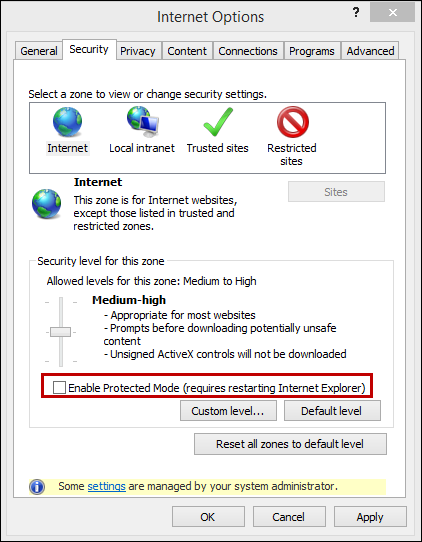
This ActiveX control is not compatible with the 64-bit version of Internet Explorer when the Enable Protected Mode IE feature is enabled. To use the above functionality, the Enable Protected Mode feature for Internet Explorer must be disabled from the Security tab in Internet Options.
In this topic